
Some would say my time is better spent writing, but I’ve had a heck of a good time designing my book covers, business cards, posters for book fairs, book signings, art shows, and other book selling opportunities. That’s creative, too, right?
I’ve used PicMonkey.com, for years to edit my digital photographs or use their stock photos for my marketing materials. You can try it for free. At first, I balked at the $99 per year subscription, but found I use it a lot….for all my social media, my book covers, business cards, personal invitations, greeting cards, and flyers for my various groups. (scroll down for a step-by-step)
A while back I found a quote from Eleanor Roosevelt –
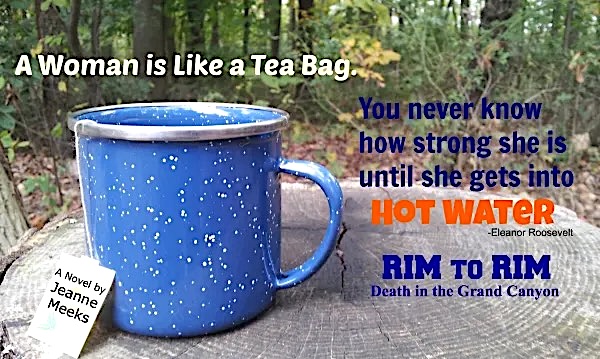
“A woman is like a tea bag. You never know how strong she is until she gets into hot water.”
It stuck with me. Then it dawned on me that a woman finding her inner strengths is a theme in all of my books. Voila!
But how to use it? I decided long ago that there are too many bookmarks out there that get dumped into the garbage after events. I want mine to be different — or at least looked at before they get dumped. I want to give the bookmark recipients a little something – a gift, a thought, some reason to hold onto my card a little longer.
Eleanor Roosevelt’s humorous, somewhat startling, words resonate with me. I guessed my target audience will like the quote, too. To sweeten the deal, I attached an actual tea bag (an eye-catcher/something for free). There’s my gift.
That gets their attention, so maybe they’ll read the name of my book and, if they’re still interested, they’ll turn the card over. On the backside I have a photo of my book covers, two short testimonials, and contact information.
How to Create DIY Promotional Materials
Step one – Find a quotation Search the internet for quotes pertaining to the themes of your book. Not quotes about you. Not quotes about your book. Find something that your READERS care about.
Step two – Choose an Image Find a picture that gives an impression from your story, sets the mood. RIM To RIM is a backpacking mystery adventure. Hence, the outdoor setting and the tree stump. As an extra tie-in, my protagonist, Amy, starts each morning in the canyon with mug of hot tea. i-stock.com and others have hundreds of inexpensive, high quality photos. Still, I didn’t find the perfect one, so I used my phone’s camera in my backyard.
Step three – Edit Photo Send your photo to your computer and upload the best to http://www.picmonkey.com. Choose a business-card sized template. Play with different fonts, effects, colors, and arrangements. Include a plug for your book. Also, leave room on the edges for cropping. In my case I had to crop top and bottom to fit on a business card. Save your design to your computer.
Step four – Get it Printed Vista Print.com is my new best friend. Choose “Your Own Design”. Upload your PicMonkey design and Poof! On the backside, include contact information: your website and your author e-mail address. Pique their interest further with a photo of your book cover and two shortened notes of praise for your work. You’d be surprised what can fit on a business card.
Step five – Make it Memorable Add something extra, so that your card doesn’t lay flat amongst all the others. (My tea bag, for example). Be creative!
Step six – Put Yourself Out There Pass those babies out like candy on Halloween. Put them into people’s hands and talk to them about the quote. Refer to the add-on. Tell the story of how you took the photo. Anything to have a conversation and get them to remember you. If they then buy the book or visit your website, hurray!
Follow along with me as I write my historical novel – (click here:) The Peasant’s Daughter:
My books are on Amazon: Rim to Rim – Death in the Grand Canyon.


 Jeanne Meeks ~ Fiction Author